|
News: |
toolbar customize: Firefox3 , IE7, IE8, Safari , Opera , Chrome |
|
Weather: Local Ventusky,
NWS
North America Radar, Etc Weather , NOAA
Weather Prediction Center, Wind Maps: USA, |
Financial: Daily
10 Yr TIPS yield, TED Spread (As a %),
Major
World Securities Indexes, Pre-Market Trading, WSJ Markets
Data Center, Market Carpets: 2, 3, 4 +,
Event Calendars 1, 2,
3, 5, 6, 7 Seeking
Alpha Market News - Live Feed |
news.yahoo ,
Antiwar.com, The Intercept, Strategic Culture Foundation, Bloomberg, WSJ($) , Online WSJ, Salon,
L A Times, WaPo, NYTimes, BostonGlobe, CSmonitor, CNN, Nuclear Threat Initiative, Tehran Times, People's Daily(English), Al
Jazeera(English) , TurkishPress(English),
Asahi Shimbun(English), Beijing
Review(Multilingual) , South China Morning Post(English) , Pravda(English), Times, CJRdaily, Counterpunch,
HotAir, Films
considered the greatest ever: The Best Film of Every Year Since 1950 , Numerous
lists - WikiPedia, Top
100 of all time, 100 Best,
Greatest Movies,
metacritic,
MovieTomatoes,
BoxOffice,
Comedy Central,
Comics, Inference (Science), Science Daily, MIT Tech
Review, TechCrunch, RedHerring,
wccftech, ArsTechnica
, The Register , Slashdot, Games, Most
Popular Web Sites, Timelines1, 2, #  PredictIt,
Iowa
IEM, Dublin
Intrade , LongBets on the Record ,
PredictIt,
Iowa
IEM, Dublin
Intrade , LongBets on the Record ,
Global News Agencies: How
Global News Agencies and Western Media Report on Geopolitics, Associated Press (AP), France-Presse (AFP), Reuters,
Reuters Video
Aggregators: newsola,
newsmap, news.Google,
Real
Clear Investigations, ZeroHedge,
Bloggers:
UNZ
Review, OffGuardian,
TomDispatch,
Responsible
Statecraft, Caitlyn Johnstone, Tom Luongo, Culture of Life News, Informed Comment (Juan Cole), Libertyblitzkrieg,
Opensecrets -
Tracking Money, Michael Hudson, Henry C.K. Liu, H.C.K. Liu at Asia Times,
Antal E. Fekete 1, 2,
Annotated
Antal, TalkingPoints,
Hot Topic Discovery, Search & Trend Tracking: Google Trends, Google Blog Search, Techmeme, memeorandum, We Smirch, ballbug, board reader
Internet Search; Knowledge Reference:
Big 4 Search:
Other
Search: Internet
Archive (The Wayback Machine), Bing,
WolframAlpha, WolframAlpha vs. Google
Squared Internet Archive, Highbeam, Dogpile
PredefinedTopicHierarchy-based search: WikiPedia, Science World, FAQs: usenet,
etc.
Targeted
Search: Image
Search: 1,
2,
Seven More Image Search Tools,
, Book
Search, Google Scholar, usenet,
Internet Archive,
Lie
pies, Hoaxes, Lies, Scams, Urban Legends, and the like: mediabiasfactcheck.com, Snopes'
Top 25, 1,
2,
3, 4, 5, 6, Universities, Find Voting Record,
Find
Federal Congressperson, Find
Federal Congressperson, Top
400 world universities, Top Universities Worldwide,
ApartmentRatings,
Find
Object in Sky,
Geographically
Localized Search:
Google Maps, Yahoo Maps, MapQuest, Yellow Pages, YahooLocal, Msft Local, Cost of Living,
Trip
Route Discovery:
Google
Directions, Yahoo! Directions
Miscellaneous
Search: Flight
Booking Search: 1, 2, 3, 4, 5, 6, 7, 8,
9,
Rental Cars, USPS: Find
a ZIP Code / Postal Rates
/ Calculate
Postage / Print
a Shipping Label / Schedule
a Pickup / Locate
a Post Office / Track
& Confirm , Track
your Package (iShip), World Factbook
(CIA), Terrorism
Words:
Click Here
Shopping: Consumer Reports, Become.com, Tech
Yahoo Epinions,
Flight Booking Search is now just above.
Medicine/Health: Stroke, Heart
Attack Symptoms, Zygote Body, MedlinePlus,
WebMD, PubMed, CDC A-Z Index, CardioSmart
Info
on:
Corporations: Transnationale.org, FCIC Consumer Action ,
GetHumanOnPhone,
DataWarehousedOnYou,
Person -> Phone/Address: Zabasearch, AnyWho, 800-Free-411, Switchboard, VerizonSuperPages,
SearchBug($)
Misc:
Home
Electric Costs 1, 2,
Other
Energy Calculators, Energy Star,
Energy Guide, Inflation Calculator,
Calculators/Converters 1,
2,
3, 4, 6, Roman Numerals <->
Decimal,
MortgageCalc,
AnnuityCalc
1, 2,
Ibiblio(was Sunsite & metalab.unc.edu), 20 Questions, Mathematica, Sage Cell Server (a viable free open
source alternative to Magma, Maple, Mathematica and Matlab),
recipes
Assets/Money/Investing/Giving:
Comprehensive
Security Analysis/Decision Sites: Yahoo! Finance, Google Finance, Seeking
Alpha, StockHouse
Canada, SmartMoney, SmartMoney
Stocks Select/Screen ($), Yahoo! Stock Select/Screen, ETFs
1,
2, 3,
Individual
Security Fundamental Analysis | Research | Due Diligence:
How to Google a stock,
Stock 'Research'
($), Tap
Seeking Alpha stable of analysts re your stock., Stock
Price Check, EDGAR, ,
Canada's SEDAR, Google Stock 'Research', Yahoo! Major Shareholders.,
Yahoo! Insider Transactions.,
Beyond
a Bank's Annual Report,
Individual
Security Technical Analysis | Charting: StockCharts,
Stockcharts
SiteMap, BigCharts,
LiveCharts,
Individual
Security Interventional Analysis: Stock
Risk Can Far Exceed Troubled Asset Risk., Short Sales &
Possible Stock Price Manipulation
Tools,
Commodities:
Option Valuation Tools 1,
2,
CME Globex
Flash Quotes, Commodity (incl currency) prices, Spot Gold 1, 2, 3, 4, 5, 6, 7,
Spot
Silver, Silver lease rates, Gold lease rates,
Asset
Account Management. Broker-Dealers: Fidelity(Login), Schwab(Login),
Interactive
Brokers(Login), TIAA-CREF( Home
Login),
TD Ameritrade, TreasuryDirect,
GoldMoney
Foreign
Exchange (Currencies):
USD/CAD = 1.06 ==> USD is more valuable (a USD 'equals' 1.06 CADs) USD to Other - Chart,
Currency Strength Heatmap, FXstreet,
NetDania
FOREX,
Crypto
Currencies
This section includes Cryptocurrency Exchange, but also all other
Cryptocurrency topics coinmarketcap.com , Coin Desk , Coindesk's Bitcoin Calculator , bitcoin.it , Cryptocompare ,
news.bitcoin.com , realtime.info , blockchain.info ,
blockCypher.com, blockTrail.com, Coinbase Exchange
Housing: Home Value Calculator,
Zillow, Case-Shiller
Index & Futures Charting Tool, Tool
Tutorial
Disaster
Mitigation: TheStreet's
Financial Strength Rating for your Bank, Bank
Failures, FDIC Deposit Insurance Estimator, CDARS for a large
deposit, IRABankRatings.com,
World's 50 Safest Banks,
Strongest and Weakest Banks,
The 'X' List,
Problem Banks List, the FDIC failed
bank list, Bank Rating Services,
Intermediary Elimination,
You
Don’t Own What You Think You Own!,
Misc:
Mut Fund costs,
Convert
to a Roth IRA?, DowDogs, BearMarketCentral
ETFs Scoreboard, BearMarketCentral MutFunds
Scoreboard, PrudentBear,
MoneyReference,
Charities: Good vs. Bad, IRS forms and pubs, tax forms
Current History: 2022
Notable, 2021
Notable, 2020
Notable, Coronavirus Pandemic, 2019 Notable, Any
and All Current History, Multiple Years, Robert
W. Malone, a famous person,
Visuals
(newest first):
An
opaque centerpiece of American foreign policy a vast network of bases and facilities
across the globe currently used to train hundreds of thousands of foreign
military and security personnel , Mars
Rover, 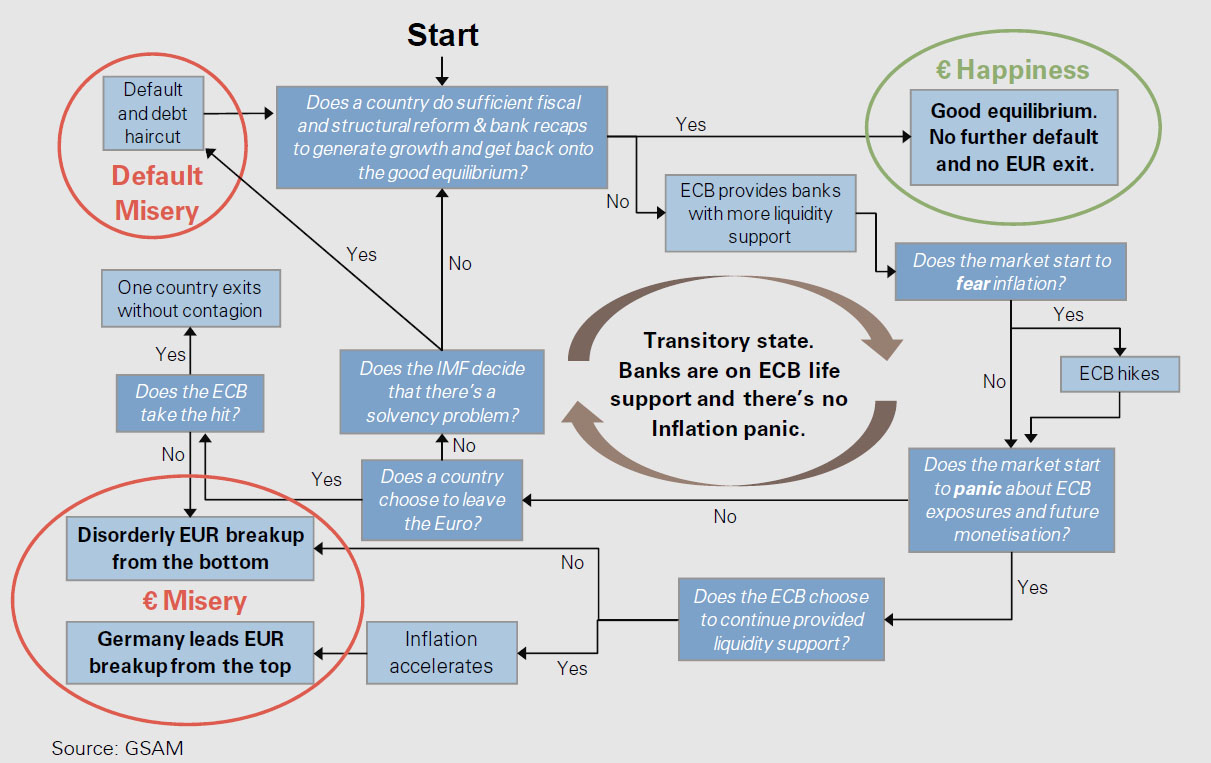 , Camouflaged
Octopus, Middle
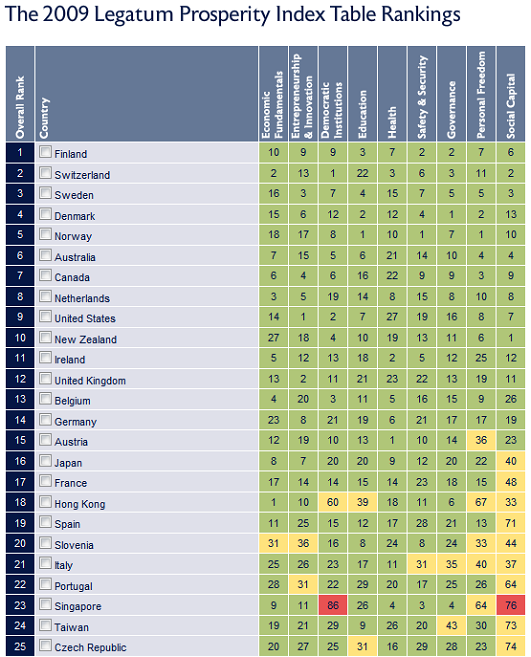
East Geography Quiz, Prosperity
by Country, Income
inequality, U.S. Debt clock,
Literature
Map, All Languages, More
visuals.
, Camouflaged
Octopus, Middle
East Geography Quiz, Prosperity
by Country, Income
inequality, U.S. Debt clock,
Literature
Map, All Languages, More
visuals.
The American
Empire: A country
can be democratic or it can be imperialistic, but it cannot be both., Defending
the Dollar, Immigration Facts, Attacking Iran,
The neocons, Truthiness,
Fascism
Privacy/Intellectual
Property/Misc:
Question Copyright,
The War Between 'Premium
Content' and Digital Freedom, US Patent Glossary, Copyright, EFF and IP, CIPP_McGill,
Common Property, BIPLOG, DMCA, DMCA
Consequences, USDOJ on IP, The Public Domain, Sampling Licenses,
Licenses explained, Choose Your License
Computer: Downdetector,
MyBandwidth _1_, _2_,
_3_, _4_, _5_,
_6_ ,_7_, _8_, Network-Tools1, Network-Tools2, TestJVM,
JavaTester,
Microsoft,
Linux, BSD Unix, Apple
Macintosh, WINW, BadBlue, Microsoft's
central protect-your-PC starting point, List of AntiVirus Software, Malware
Removal Guide, Spyware
Information Center, RFCs, Eclipse IDE, CVS, Character/Symbol Codes
Other
homeplace pages like this one: Between the Hedges, Riza
Eemirer, NYT
'Home Page' for readers and journalists
General Comment:
To be "on the 'net", you need the ability to pass data packets
between your computer and another one anywhere in the world. The cost of
packet-passing ($/month) is charged by the provider who supports the "last
mile" between your computer and the Internet.
Varying technologies are available to implement the last mile to your computer(s) at home. There's dialup-modem or DSL via your phone line. There's fibre optic or coaxial cable. And there are some hybrids, like dialup-modem out together with satellite in.
To allow more than one computer, on a home network (LAN), to have internet access, your internet address will be that of a specialized computer you use, a 'router'. The router, 'on' both the internet and the home LAN, passes every incoming packet through to the computer in the home previously identified to the outside sending 'server' computer (by the router's address plus a 'port' used to identify that particular home computer). And it passes a packet from that computer to the internet when the packet address is non-local.
Some or all connections between computers (including the router) in the home can be over a wireless LAN (typically wi-fi). A 2-way radio in your computer and another at a wireless access point (a separate box or part of the router) implement the connection.
Varying technologies (cellular, PCS, ...) are also available to implement the last mile to your laptop whenever it's where a mobile phone can be used. You can even browse the internet while a passenger in an auto!
In addition to passing packets, most people like a "Portal" page --a 'desktop' for your worldwide web browser making your favorite 'favorites' a little more easily accessible. Ideally, a portal page makes everything on the Internet you want readily accessible. And it stays current as new items of interest become available and as your interests change.
The portal page service is totally separable from last-mile and packet-passing services, but the two are often bundled.
A portal like Yahoo or AOL will try to pick up a little extra revenue by trying to pass your packets.
Conversely, a mainly-last-mile vendor like Verizon or Comcast, when it installs your packet-passing hardware, will try at least to reset your browser's home page and likely even try to install their own version of the browser you use and install other stuff. This steers you to their portal page. There is in general no need to install *any* of their software!! (Just bookmark the URL of the last-mile vendor's technical support page and account management page.)
Most well-known portal pages steer you towards things they want you to think or buy. The portal page is free to you but earns money for the provider (by channeling you to sites that will pay to have that done). Here are some examples: NetZero, Earthlink, Verizon, MSN, AOL, Yahoo
These things have gotten way over the top, and even Microsoft recognizes that there is something better!
But you can go all the way and use your very own portal page.
This homeplace web page can be used as-is from chasegalleryconnect.org. (It can be used with Windows, Macintosh, Linux, or other operating system. The following discussion is Windows-oriented : contact webmaster aht chasegalleryconnect.org if you can help augment the following for those contexts.) Or it can be saved on your desktop, in 'My Documents', or anywhere on your hard drive. You can select it as your browser home page as follows.
For Microsoft Internet Explorer or Firefox you do: Tools >> [Internet] Options >> General >> Use Current Page.
For Netscape/Mozilla you do: Edit >> Preferences >> ...... >> Use Current Page.
To alter this page to your own liking (You can, for example, edit the zip code into yours and get near-instant local weather.), view it with Windows Explorer, right-click its name and do Send To > Notepad.
Or open 'Notepad' and then do Notepad>>File>>Open and chase down
this very file to edit the text which describes the web page you're viewing. It
will be at a location such as: "H:\Documents and Settings\JohnDoe\Desktop\homeplace.html"